This post may contain affiliate links. Please see my disclosure policy for details.
Gaming laptops pack desktop-level graphics and fast displays into portable designs, letting players run modern titles, stream, and edit video from a single machine. Advances in GPUs, CPUs, and thermals in 2026 mean machines now balance raw performance, battery life, and quieter cooling better than ever, and many models add features like AI-accelerated upscaling, high-refresh OLED panels, and modular expandability for storage and RAM.
Buying a gaming laptop comes down to trade-offs: GPU and CPU performance determine frame rates and future-proofing; display resolution, refresh rate, and color accuracy affect visual clarity and responsiveness; thermals and chassis design influence sustained performance and noise; and battery life, weight, and port selection shape portability and everyday usability. We tested and compared current models across performance, thermals, display quality, battery life, and real-world use to highlight the best options for different budgets and priorities.
Best Gaming Laptops of 2026
Below is our curated list of the best gaming laptops for 2026, chosen for performance, display quality, thermals, and battery life. We tested models across budgets and use cases to help you find the right balance of power and portability.
ROG Strix G16

We recommend this if you want a high-refresh, versatile 16-inch laptop that handled our demanding gaming and creative workloads smoothly.
Pros
Excellent high-refresh display with strong color and motion handling
Snappy real-world performance for gaming and multitasking
Solid cooling kept sustained loads stable
Cons
Heavier than ultraportable alternatives
RGB lighting and gamer styling may not suit every setting
Battery life felt limited under heavier use
We pushed the Strix through long play sessions and creative export jobs and the panel kept up—games looked crisp, menus felt instant, and motion stayed clean at high frame rates. The keyboard felt familiar and responsive for fast inputs, and the audio gave us decent immersion when we didn’t use a headset.
Thermals impressed us: the chassis stayed warm but never throttled dramatically during extended sessions, and fan noise stayed tolerable until we pushed max performance. Upgrading storage or RAM felt straightforward, which we appreciated for future-proofing.
Port selection handled peripherals without drama and Wi‑Fi 7 made online play snappy in our testing environment. If you prioritize raw frame rates, a bright 16:10 display, and easy upgrades over extreme portability, this unit served us very well.
Acer Nitro V 16S AI

We recommend this if you want a slim, portable gaming laptop that balances strong GPU performance and everyday portability without breaking the bank.
Pros
Slim, easy to carry for LANs or travel
Quiet cooling under sustained loads in our testing
Smooth high-refresh display for fast-paced titles
Cons
Charger and performance limits in extreme mode can feel constrained
Trackpad required setup quirks out of the box for some users
Battery life is good but not exceptional under heavy gaming
We spent several sessions playing recent AAA titles and streaming while multitasking, and the Nitro V felt surprisingly composed for such a thin chassis. The RTX 5060 kept frame rates steady and the 180Hz WUXGA panel made motion smooth without color feeling washed out.
Portability stood out; at about 4.6 pounds the laptop slips into a backpack and we didn’t mind carrying it to a café or meet-up. Thermal behavior impressed us—fans stayed reasonable and the quad-intake design kept peak temps lower than we expected during long runs.
The one-area friction came from power delivery and initial setup. Pushing the machine into its highest performance state needs the right power profile and the included brick can limit headroom, and we had to tweak trackpad settings initially to get a natural feel.
Overall, the Acer Nitro V 16S AI gives most gamers and content creators a strong mix of mobility and GPU muscle in a tidy package. If you value a slim build and smooth gameplay over maximum battery endurance or absolute top-tier thermals, this is worth considering.
ROG Strix SCAR 18 (2026)

This is a top-tier desktop-replacement laptop for serious gamers who want uncompromised performance and a stunning 4K 240Hz display.
Pros
Blistering sustained performance under load
Incredible 4K HDR clarity with fast motion handling
Tool-free upgrades and premium cooling for long sessions
Cons
Heavier and bulkier than portable gaming laptops
Runs warm under extreme loads despite advanced cooling
Battery life is modest given the power and bright 4K panel
We pushed this machine through long play sessions and content work; it stayed responsive when we cranked settings to max and never felt like it was throttling at the moment we needed frame consistency. The cooling system keeps fans predictable, and the chassis manages heat better than most gaming notebooks we’ve used, though you’ll still notice elevated surface temps under sustained benchmarks.
The 4K Nebula HDR panel impressed in both single-player cinematic titles and fast multiplayer matches — colors pop without washing out and motion clarity reduces blur when we move quickly in-game. The AniMe Vision lid and RGB options are fun to tweak, but we appreciated the option to go stealth for focused work.
We upgraded storage and swapped RAM modules without opening screws; that tool-less access saved time during testing and made customizing the machine painless. Connectivity options like dual Thunderbolt 5 and Wi‑Fi 7 felt future-proof during peripheral testing, but expect to tether for ultra-low-latency esports play.
If you want a true performance-first laptop that doubles as a portable workstation, this SCAR 18 delivers in ways we found consistently reliable and powerful.
Legion 5i (2025)
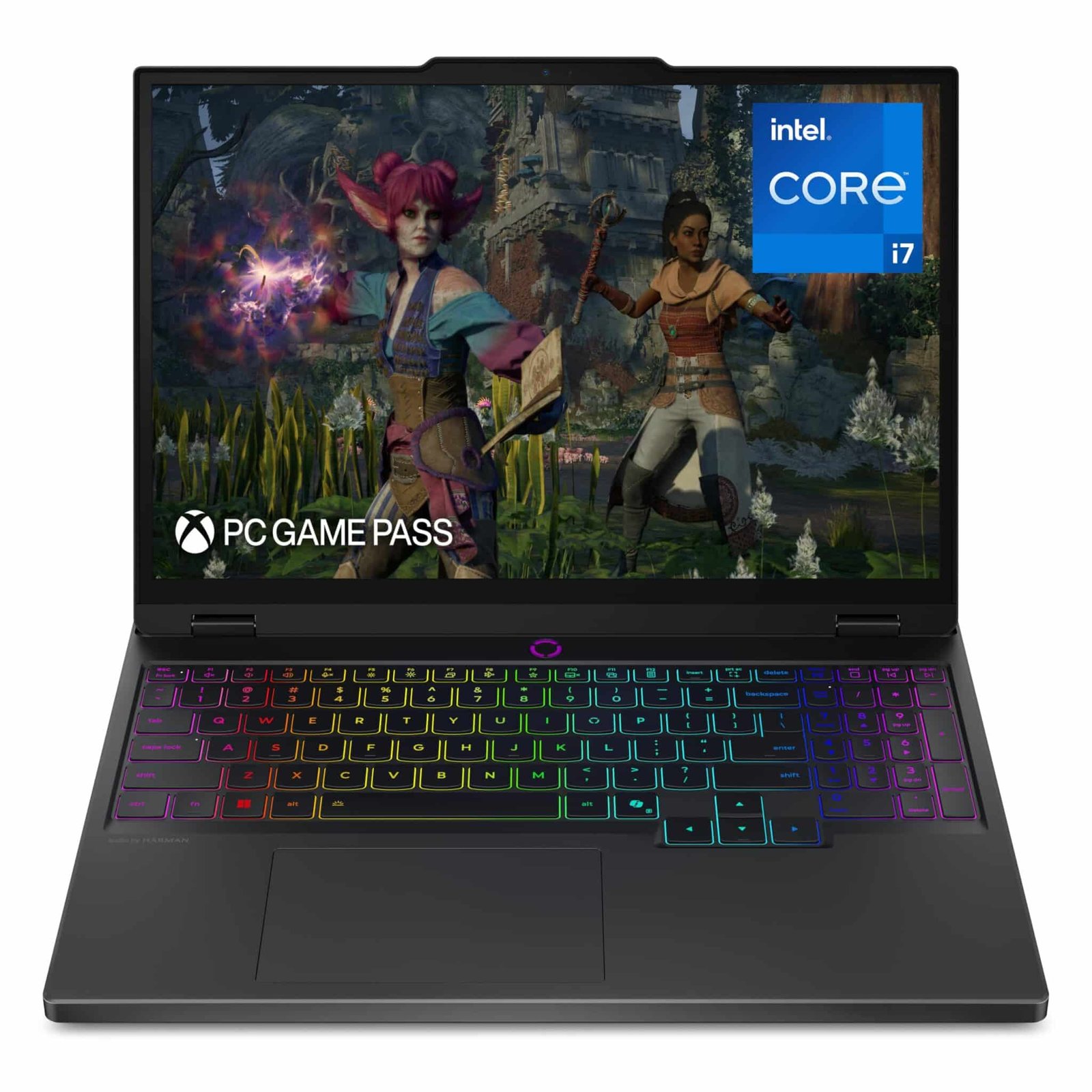
We recommend this if you want a portable, powerful gaming laptop that balances high-frame-rate play, creative work, and campus mobility.
Pros
Strong real-world performance for both games and creative apps
Vibrant PureSight OLED makes games and media pop
Cooler, quieter under load than many rivals thanks to Legion Coldfront
Cons
Fans still spin up noticeably in heavy sessions
Battery life drops under sustained gaming
Webcam omission may frustrate students who attend online classes
We used the Legion 5i as our daily driver for a week and felt its speed immediately. Boot times and app launches were snappy, and demanding titles ran at playable frame rates without constant tuning.
The PureSight OLED display delivered deep contrast and accurate colors that improved both gaming immersion and photo work. Text looked crisp during long reading sessions, and the screen stayed comfortable for coursework and streaming.
Thermals impressed more than expected — the Coldfront system kept core temps reasonable while noise stayed lower than many high-power laptops. Still, prolonged high-FPS play pushed the fans into audible territory.
Portability stood out; the chassis felt lighter moving between classes and the battery handled light productivity all day. Heavy gaming tethered us to the charger, but fast-charging rescued us between sessions.
We appreciated Lenovo AI Engine+ and Legion Space for straightforward performance boosts and system control. The keyboard felt reliable for long typing stints and fast inputs during competitive play.
Buy it if you want a versatile machine that excels at both gaming and schoolwork without being an anchor; skip it if you need whisper-quiet cooling or top-tier battery life for all-day unplugged gaming.
TUF F16 (ASUS)

We recommend this if you want a durable, no-nonsense gaming laptop that balances solid performance and sensible price for 1080p gaming.
Pros
Reliable thermal design keeps sustained frame rates stable.
Crisp 165Hz FHD+ panel that makes fast games feel smoother.
Military-grade build that survives travel and daily knocks.
Cons
Heavier than ultraportable gaming notebooks.
Battery life drops under heavy gaming load.
Integrated webcam is limited for streaming.
We pushed the TUF F16 through several sessions of shooter and open-world testing and found it consistently handled long stints without choking. The cooling layout and Arc Flow fans do their job; fans ramp but rarely feel intrusive compared with many other midrange machines.
We liked the 16:10 165Hz screen for competitive play—the motion felt responsive and colors held up for content work. The RTX 5050 with a healthy TGP translated into playable settings at native resolution across modern titles.
We noticed the chassis weight when carrying it around all day, and battery endurance fell short during extended portable use. If you plan to game plugged in most of the time, the trade-offs are reasonable for the performance and durability you get.
Overall, we found the TUF F16 to be a practical pick for gamers who prioritize sustained performance and toughness over extreme portability.
Acer Nitro V 17 AI

We recommend this when you want strong GPU-driven gaming and AI features in a 17-inch laptop that stays surprisingly quiet.
Pros
Solid ray-tracing performance and AI-driven frame boosts.
Large screen with smooth 144Hz motion for fast-paced titles.
Runs cool and quiet under typical loads.
Cons
Display color and brightness felt a bit flat to our eyes.
Chassis and hinge show minor flex during handling.
Some users report intermittent software hiccups out of the box.
We pushed the Nitro V 17 AI through long play sessions and content tasks, and the RTX 5070 power combined with AMD Ryzen responsiveness felt immediately noticeable. Games ran smoothly at high settings and DLSS visibly improved frame pacing without blurring fine detail.
The 17.3-inch panel kept action fluid at 144Hz, which made competitive shooters and racing games feel more precise. We did wish the panel had deeper color and higher peak brightness—HDR and vivid scenes didn’t pop like on pricier displays.
Thermals impressed us: the laptop stayed relatively quiet and cool during extended sessions, which helped keep headset and keyboard comfort intact. However, the lid and hinge had a subtle wobble that made one-handed opening less reassuring.
Setup was straightforward but we encountered a couple of minor software quirks that required updates; support resources fixed those quickly in our experience. If you need a large, portable gaming machine that favors performance and silence over an elite display, this model is a practical choice.
KONZID LX15PRO (2026)

We recommend this laptop for budget-conscious gamers who want solid Ryzen performance and a roomy 16″ screen without breaking the bank.
Pros
Smooth multi-tasking and gaming feel from the Ryzen 7 responsiveness.
Large 16″ FHD display that keeps visuals clear during long sessions.
Plenty of I/O and an upgrade-friendly layout.
Cons
Integrated graphics limit high-frame competitive play at ultra settings.
Build feels light and slightly plasticky compared with premium metal rivals.
Battery life is okay for daily use but not great for marathon unplugged gaming.
We pushed the LX15PRO through mixed workloads and found the Ryzen 7 chip handled streaming, browsing, and medium to heavy gaming without obvious stutters. Boot and load times felt snappy thanks to the NVMe SSD, and the 16GB RAM kept apps from competing for resources.
The 16″ screen delivered honest colors and comfortable viewing; it’s easy on the eyes during extended play or editing sessions. Typing on the backlit keyboard proved usable for long stints, though the chassis flex at the lid reminded us this is a value-focused design rather than a premium chassis.
Ports cover our usual accessory needs—HDMI, full-function USB-C, multiple USB 3.2 ports, and a card slot—so we connected an external monitor and peripherals without hunting for adapters. Expect decent Wi‑Fi 6 performance for online matches, but plan to lower graphical presets if you chase very high frame rates since the Radeon integrated solution has limits.
We appreciate the straightforward one-year warranty and lifetime support promise, and the ability to upgrade RAM and storage extends the laptop’s practical lifespan. If you want a portable, cost-conscious gaming workhorse that you can improve over time, this model fits that niche well.
Acer Nitro 16S AI

We recommend this if you want a slim, portable gaming laptop that balances high-end GPU power with reasonable price and strong AI features.
Pros
Strong real-world frame rates and responsive AI features.
Slim, well-built chassis that travels easily.
Bright, smooth 16″ display for fast-action games.
Cons
RTX 5070 Ti runs hot under sustained load.
Fans get loud during heavy gaming sessions.
Battery life is middling for long mobile use.
We pushed this Nitro through modern AAA titles and competitive esports sessions and found it consistently held high settings without stuttering. The combination of Ryzen AI 9 and the RTX 5070 Ti felt snappy in both gameplay and background tasks we ran at the same time.
Portability surprised us: the slim profile and light weight made it easy to carry between locations. The screen’s 180Hz refresh and accurate colors made quick aiming and cinematic scenes equally enjoyable.
Thermals are the trade-off for the thin design. Under long play sessions the chassis warmed noticeably and fan noise rose; we used a cooling pad for extended tournaments to keep clocks stable.
Everyday productivity and streaming worked smoothly; Copilot+ AI features added useful shortcuts and background acceleration that saved us time. For those who prioritize raw desktop-replacement power in a portable frame, this laptop hits a compelling middle ground.
Buy on Amazon: Acer Nitro 16S AI
ROG Strix G18 (ASUS)

We recommend this if you want a desktop-grade gaming experience in a portable 18″ laptop with top-tier cooling and modern connectivity.
Pros
Exceptional sustained performance for long gaming sessions.
Immersive 18″ 2.5K 240Hz screen that feels spacious and responsive.
Future-ready connectivity and fast storage for multitasking.
Cons
Heavier and larger than typical laptops, so not ideal for frequent travel.
Battery life is limited under load despite fast-charging.
Four-zone RGB is useful but not as customizable as per-key lighting.
We pushed this machine through extended playtests and content tasks, and it held frame rates more consistently than many rivals. The intelligent cooling kept clocks high without sounding like a jet at normal load, which mattered during long competitive matches.
The Nebula display impressed in fast shooters and cinematic scenes alike; motion stayed clean and colors stayed accurate when we calibrated it. Window and app placement felt natural on the 16:10 canvas, making multitasking less fiddly during streams and editing.
Carrying it day-to-day reminded us this is a heavy unit—the chassis and power pack add up—so plan desk-first setups or short trips. Charging from near-empty to usable quickly helped us jump back into games, but unplugged runtime under load remains a trade-off for the performance.
Ports and wireless tech simplified connecting to docks and high-refresh externals, which we used for a dual-monitor rig with minimal fuss. The keyboard and speakers delivered solid feedback for gaming sessions, though we missed a full per-key RGB option for more granular lighting profiles.
Overall, we found the ROG Strix G18 to be a powerful, practical choice when raw performance and a roomy, fast display matter more than pocketable size.
ASUS ROG Strix G18

We recommend this if you want near-desktop power in a portable-ish 18-inch laptop for high-FPS gaming and heavy content work.
Pros
Desktop-class performance for demanding games and editing.
Immersive large 18″ 2.5K 240Hz screen that makes multitasking easier.
Robust connectivity and fast storage that speed workflows.
Cons
Heavier and larger than typical laptops, so less travel-friendly.
Runs warm under sustained load despite advanced cooling.
Battery life is limited when pushing high settings and brightness.
We pushed the Strix G18 through long gaming sessions and a few quick edit passes, and it felt like using a compact desktop replacement. Frame rates stayed steady in competitive play and switching between apps didn’t introduce hiccups.
The 18-inch Nebula display gives us room to keep a game, chat, and an editing timeline visible at once. Colors and motion clarity held up when we cranked refresh rates, though the panel’s brightness and high settings do draw power.
Ports and Wi‑Fi 7 made hooking up multiple peripherals effortless during streaming and capture work. Carrying it around felt noticeable; expect to treat this as a powerful mobile station rather than a lightweight commuting laptop.
Buying Guide
We prioritize performance balance and long-term value when selecting a gaming laptop. Focus on the CPU and GPU combination first; they determine frame rates and future-proofing.
We check display specs closely. Look for panel type, refresh rate (120Hz or higher for smooth play), resolution, and color accuracy for both competitive and immersive titles.
We assess cooling and sustained performance. Better thermal designs maintain boost clocks under load and reduce throttling; consider chassis size and fan layout as part of that evaluation.
We weigh memory and storage choices. Aim for at least 16 GB of RAM and NVMe SSD storage for fast load times; ensure upgradeability for future expansion.
We examine battery life and power delivery realistically. Gaming laptops often trade battery runtime for performance, so consider charging options, wattage limits, and whether you need portable battery endurance.
We evaluate connectivity and input ergonomics. Multiple high-speed ports, Wi‑Fi 6/6E or newer, and a comfortable keyboard with adequate key travel matter for daily use and peripherals.
We compare displays, thermals, and ports using clear criteria. Below is a compact reference table we use to rank candidates during selection.
|
Criterion |
What to look for |
Why it matters |
|---|---|---|
|
CPU & GPU |
Latest-generation parts, matching thermal headroom |
Determines playable settings and longevity |
|
Display |
≥120Hz, IPS/OLED options, resolution fitting GPU |
Balances smoothness and visual fidelity |
|
Cooling |
Vapor chamber/heat pipes, high airflow |
Prevents performance drops under load |
|
RAM & Storage |
16 GB+ RAM, NVMe SSD, upgrade slots |
Enables multitasking and fast loading |
|
Ports & Wireless |
Multiple USB-C/USB-A, HDMI, Wi‑Fi 6/6E+ |
Connectivity for docks, headsets, and online play |
We recommend prioritizing features based on our use case: competitive esports, content creation, or portability.